
A RAT that breaks JADX.
How an Android RAT wrapper uses malformed binary XML and unreachable DEX payloads to break JADX.
Index
- Note
- Introduction
- What it actually is
- The binary files in root
- How the manifest breaks the parser
- Normalizing the manifest
- How the bytecode breaks the parser
- The embedded encrypted APK
- The fake store UI and install flow
- The VPN interference
- The inner payload’s command channel
- The RAT itself.
- Practical implications for running it
- Conclusions
- Source references
Note
This isn’t meant to be a complete analysis of malware, as a result this document does not strictly if at all follow the proper structure for a professional report pertaining to an investigation of live malware, nor is it to be treated as such. Instead it provides a view into my experience when reverse engineering a sample that interested me enough to write a post about it, due to a key detail which is its obfuscation, while also covering its capabilities and connections on a superficial level.
The sample is located at 0d9e970507baf8216c3a338d09d24e47d78a500b3b20d08836a8dc0e0282aeac
The code accompanying this article is available in the arjadx repository
Introduction
While looking at malware samples on MalwareBazaar to test a little MA Lab I was working on I came across a recently uploaded Android APK which presented an obfuscation technique I had not encountered before in an Android Application.
My first impression of the APK came when dropping it in JADX, which gave me a view of its files, where I observed a large amount of binary files with seemingly random names all in the root directory.
But what stood out most was an empty AndroidManifest.xml.
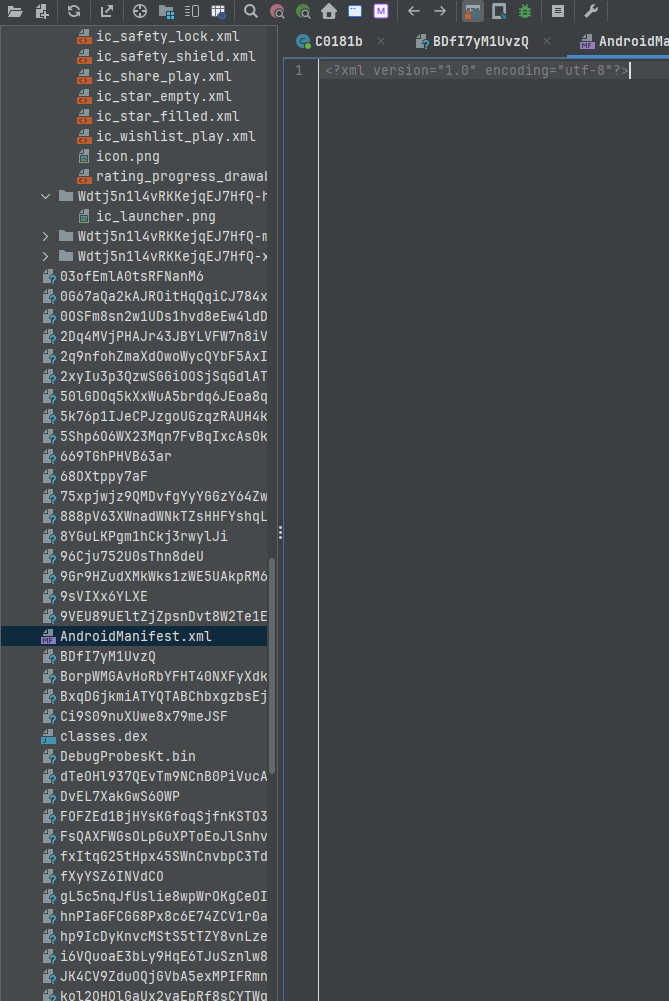
JADX displayed only the XML declaration. I had never seen that happen with an APK that still installed and ran. Doing a bit more digging into the Smali source code of the application led to finding the next layer of obfuscation, where every method tail had been broken, causing JADX to be unable to even remotely get an understanding of the underlying bytecode.
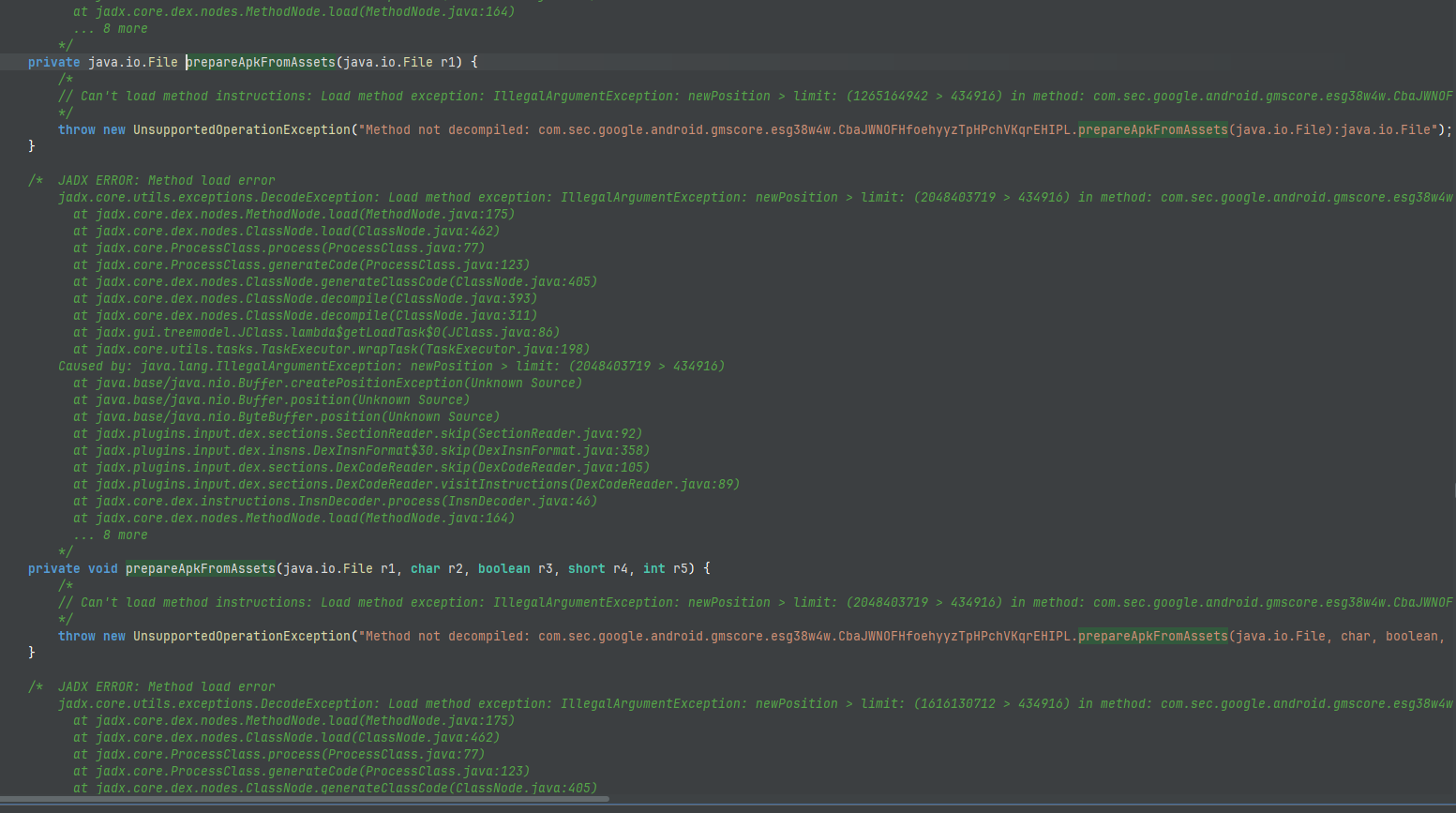
This was bad. And interesting.
JADX could not decompile the application’s methods or recover useful manifest content, yet the APK installed and ran. The manifest clearly contained enough valid information for Android to load the app. The failure appeared to be in how the analysis tool interpreted it.
So what is going on?
What it actually is
The APK turned out to be a fake Play Store wrapper around an embedded, encrypted remote access trojan (RAT). The failures above were consistent with deliberately malformed structures designed to disrupt analysis tools.
The outer APK (SHA-256 0d9e970507baf8216c3a338d09d24e47d78a500b3b20d08836a8dc0e0282aeac) is a launcher dressed up as a Play Store page labelled “ICICI CREDIT CARD” (package com.sec.google.android.gmscore.esg38w4w). It carries a second, encrypted APK inside its assets, which once decrypted turns out to be a credit-card phishing RAT (com.sec.google.android.gmscore.q2b73qeu) that collects SMS, contact, installed-app, screenshot and activity-log data, and takes commands over Firebase Realtime Database.
The binary files in root
The APK contained redundant zip-entries meant to make JADX unzip junk files, creating the effect we observed where the root directory contained files with seemingly random-generated names, and filled with junk data. This was aimed at creating noise within the APK.
How the manifest breaks the parser
Figuring out the trick behind the manifest was quite simple.
Decoding the APK with apktool showed that the manifest was readable. Inspecting the original binary XML then revealed why JADX handled it differently. The manifest itself is unencrypted binary XML, so no unpacking was needed to look at it. But it turned out the manifest inserts an unknown chunk that makes JADX stop before the root element. Concretely:
- an injected chunk of unknown type
0x0200(size0x894) at0x8927c, placed before any XML namespace has started. JADX’sBinaryXMLParser.decode()hits the unknown type which then goes into the conditionnamespaceDepth == 0and just returns, assuming the rest of the file is trailing padding, which is exactly why JADX spat out a 40-byte, declaration-only XML. - a bogus
END_NAMESPACEchunk at0x89b10. - inflated attribute offsets and strides: the root element at
0x89ff0usesattributeStart=221, where JADX expects0x14, with other nodes carrying nonstandard offsets and strides. - attribute names containing literal XML-looking text, plus around 1,047
uses-permissiondeclarations of which only seven are real while the rest is generated noise.
What makes the binary readable despite all of this is that Android’s own resource reader walks chunks by their stored sizes and skips unknown ones, and reads attributes by their stored offsets and strides. Following those fields recovers all 1,108 elements cleanly, despite the structures that tripped up JADX. Some attribute names also contained text that would need escaping or sanitizing when represented as XML.
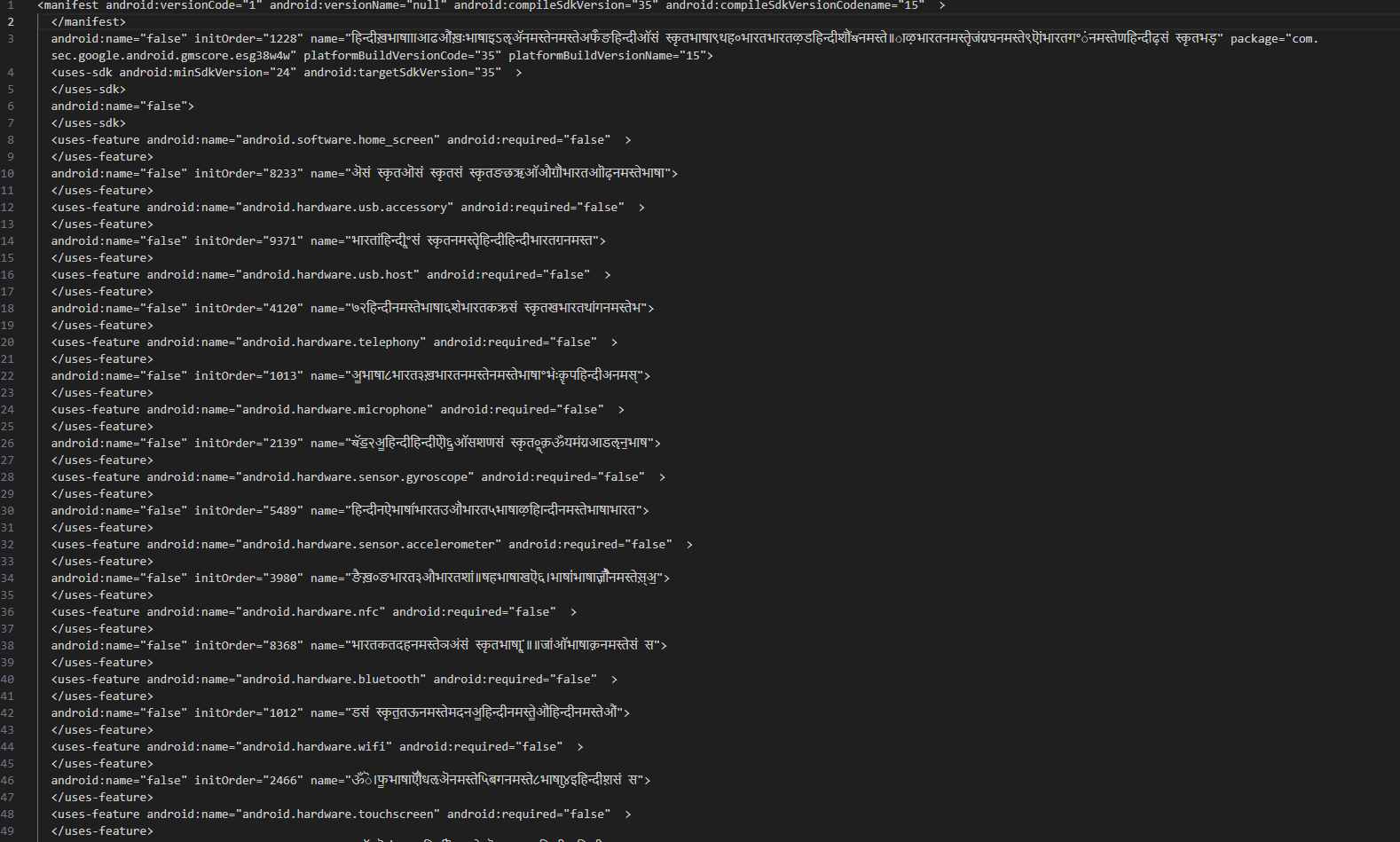
The recovered manifest is a fake-store facade: no custom Application class, a launcher activity, a PACKAGE_ADDED receiver, a VPN service, an install-complete receiver, and the ~1,047 permission declarations above, most of it generated noise.
Normalizing the manifest
The normalized manifest exposed the wrapper’s declared permissions and components, including a VPN service. Next, I needed to recover the Java code and understand why method decompilation was failing.
To fix this I used ChatGPT to help write a normalization script that handled these irregularities and emitted diagnostic metadata.
Why ChatGPT? I thought it would be time-consuming to write a script for this purpose which would severely delay what was a quick investigation on a new sample and extend it another hour or even two at worst over fixing the manifest.
Running the script produced a readable AndroidManifest.xml which provided a good amount of information on the APK.
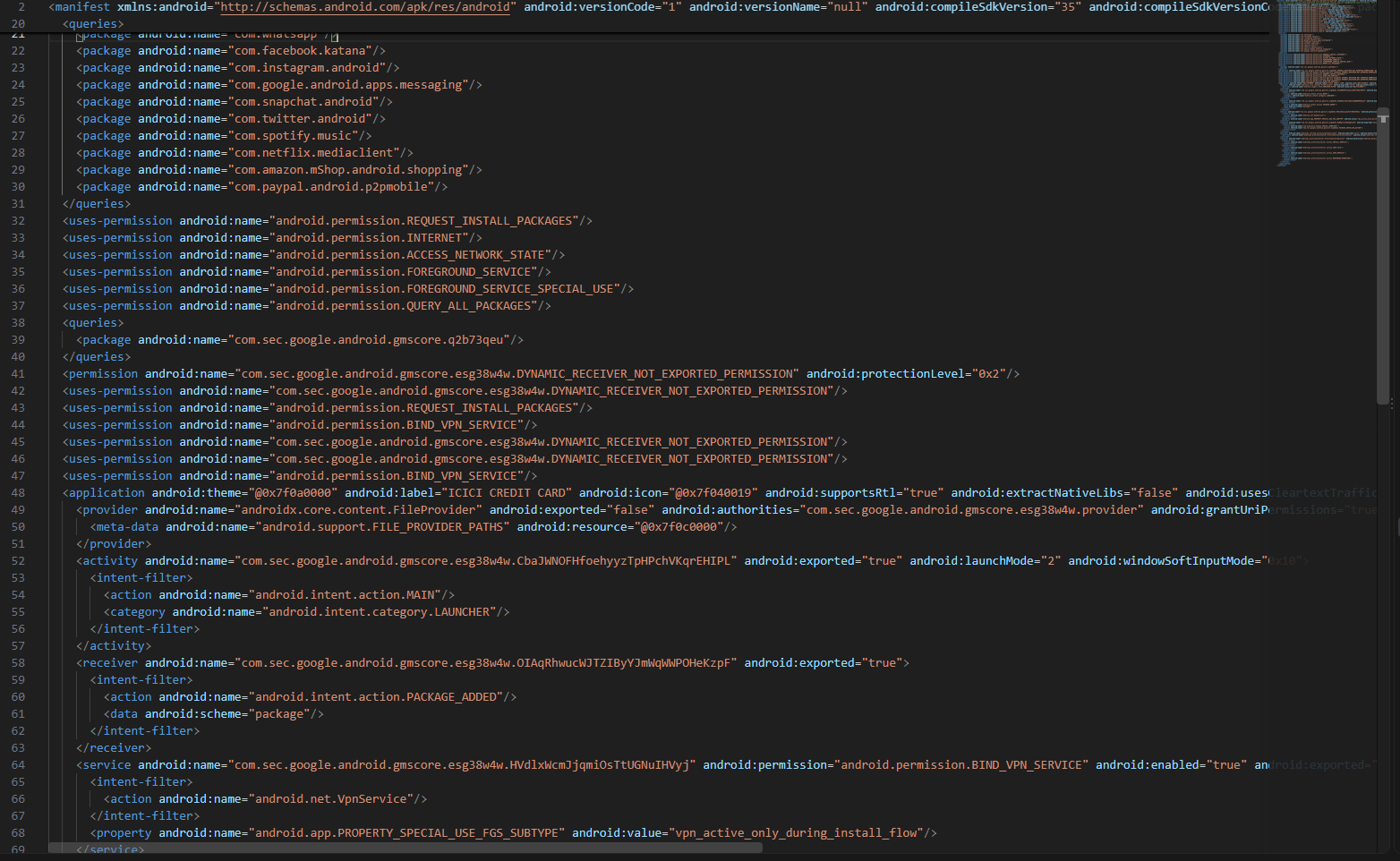
The normalized manifest exposed the wrapper’s declared permissions and components, including a VPN service. Next, I needed to recover the Java code and understand why method decompilation was failing.
How the bytecode breaks the parser
The Smali did not seem to be modified at runtime like I was fearing, because it wasn’t. Falling back to Dalvik bytecode in JADX showed me why the code was failing to be understood at all:
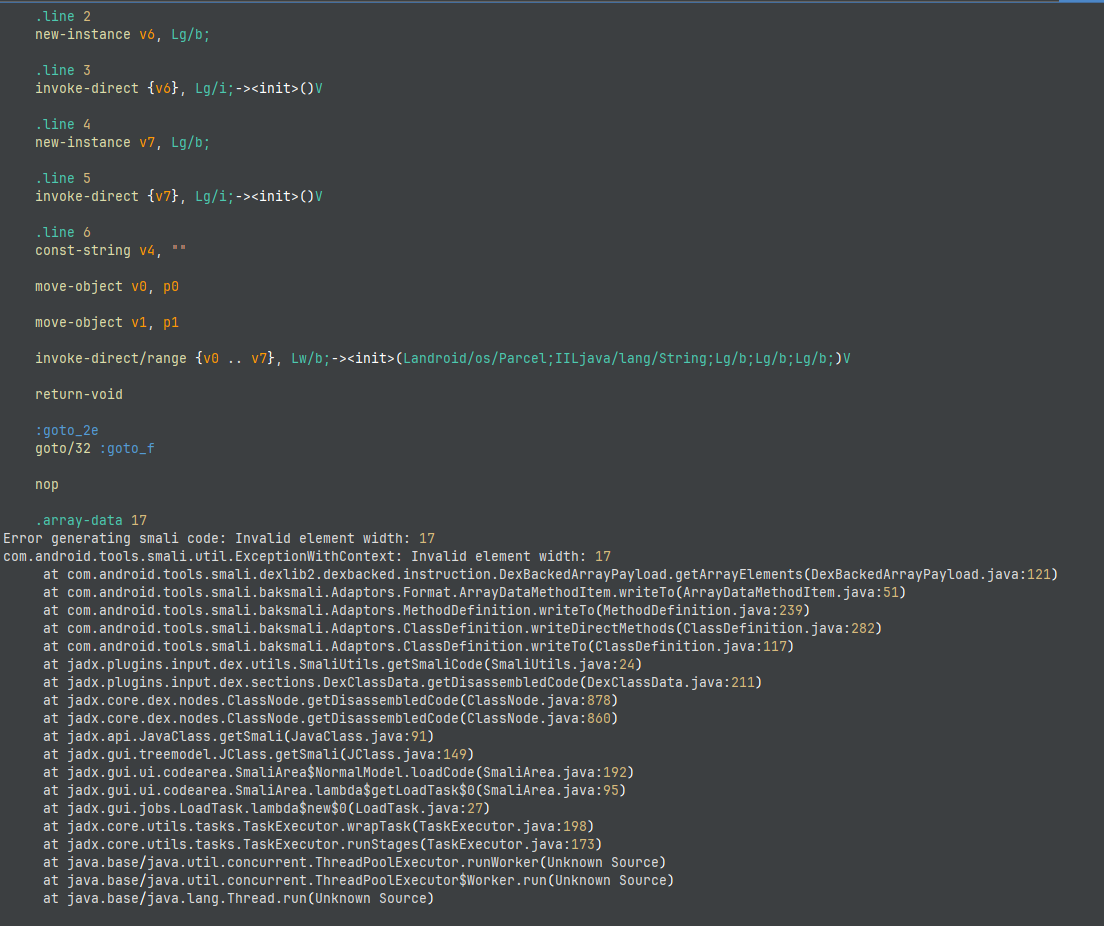
Check out the error message and the instruction immediately before it.
nop

.array-data 17

"Invalid element width 17."
It turns out every one of the sample’s 1,945 code-bearing methods in the outer DEX ended in an appended fill-array-data payload whose element width was an invalid odd value, ranging from 3 through 19, parked right after a return, throw, or unconditional goto. Nothing ever branches into those tails, so they are dead weight. But JADX’s linear payload decoder materializes a Java primitive array from the width, accepts only 1/2/4/8, and throws on anything else mid-decode, before any later control-flow cleanup could discard the unused tail, which collapses the method’s decompilation entirely.
The actual instruction bodies decode fine. ART’s verifier tolerates a bounded, unreferenced payload parked after a return, since it’s data and not executable flow which is why the sample runs on a device while breaking the decompiler, and it closes the loop on the contradiction at the top of this document.
Since these arrays were completely unused and followed a clear pattern, it was easy to replace them with equal-length NOPs, update the DEX, and run JADX over it again. That is what dex/classes.analysis.dex is, just those 1,945 malformed tails replaced with same-length NOPs, with offsets, sizes and exception metadata untouched and the checksums recomputed. JADX 1.5.5 then decompiled the analysis DEX without errors.
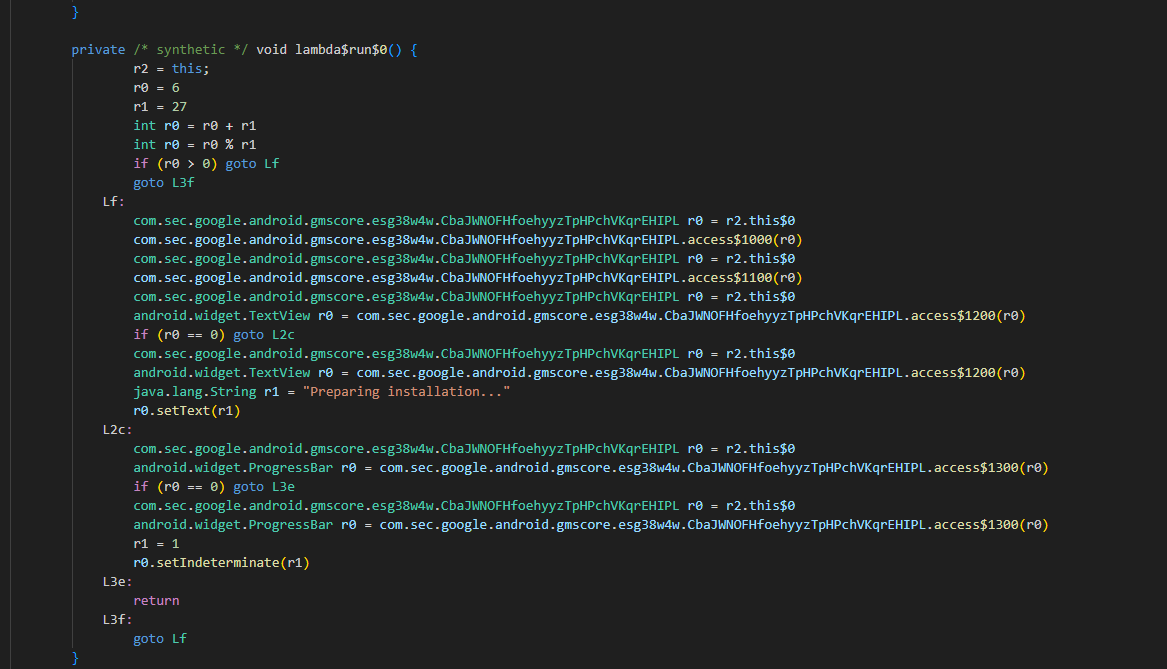
This now produced a view of the real code, which surprisingly was not further obfuscated.
The embedded encrypted APK
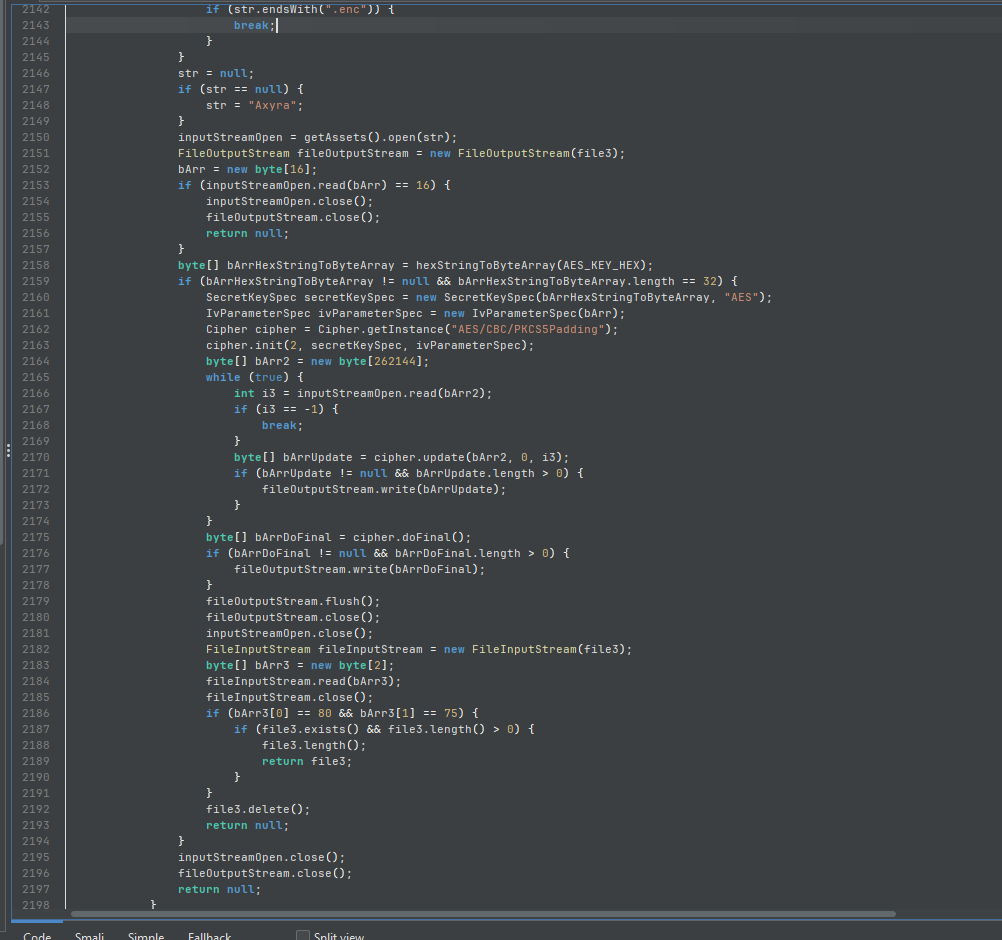
The wrapper’s carries its second stage APK as an encrypted asset. The asset in question is 50okiidob6g6.enc (7,306,752 bytes. The first root asset ending in .enc, with a literal-name fallback of Axyra, perhaps the name of the malware, though this string alone is not enough to identify a malware family.).
The wrapper decrypts the asset using AES-256-CBC with PKCS7 padding under a hardcoded key (b7fcadb82c9ee0bf873c9c1b670285c22814b69201d01fe640cb2e409131b7f1), the IV being the asset’s own first sixteen bytes. Decrypted, the payload comes out to 7,306,731 bytes (SHA-256 69f26a5dc5dc7a7754baad19769e61d71f331527705849ceb6af813f25a1d182), with the padding and every ZIP member’s CRC verified.
Reproducing the decryption only took copying over the logic into a script and running it over the asset.
The sample for the decrypted payload is in sample, zipped under the password DONOTRUNME.
One issue: the ordinary JADX Java output for the prep method gets the IV-read branch backwards and drops the asset-selection control flow, you may attempt using a different decompiler or interpreting the instructions at a lower level in JADX, in my case I relied on the lower-level instructions to reconstruct that logic; the Java output alone is misleading here.
The fake store UI and install flow
The wrapper decrypts the payload while setting up the fake Play Store page, before anyone taps Update unless the target package is already installed, in which case it just launches it. The decrypted APK supplies the package name, icon and label shown in the UI.
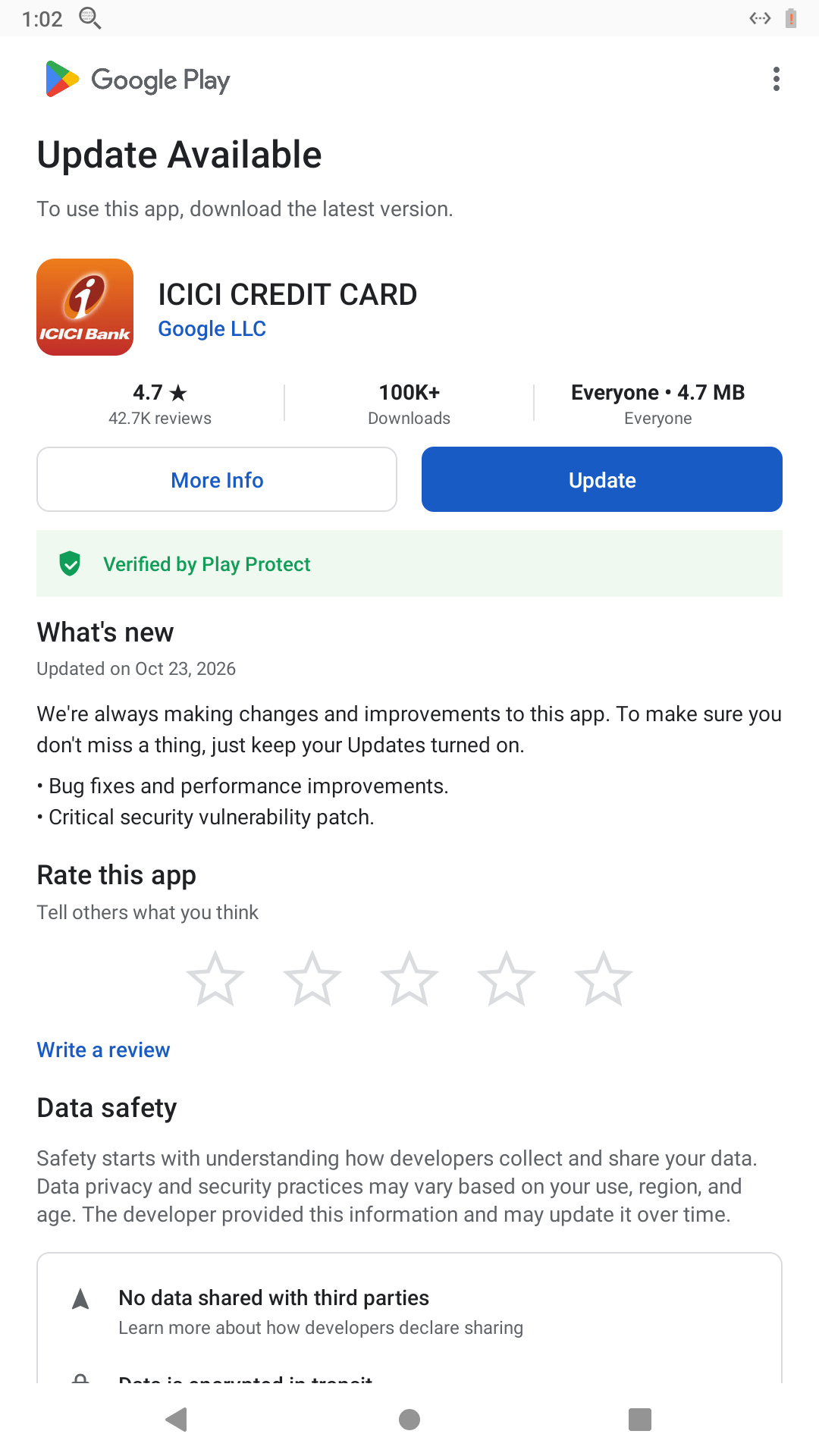
The Update button goes through the PackageInstaller session APIs (createSession/openWrite/commit), with Android’s own installer confirmation still in the loop. The visible progress bar is pure theatre: fixed sleep loops climbing 0-90, then 91-95, then 96-98, and finalizing at 99%. And there is no HTTP downloader anywhere in the wrapper, the payload is embedded in the APK.
The VPN interference
The wrapper additionally runs a VpnService that routes all IPv4 through a TUN interface, fabricates NXDOMAIN responses for googleapis.com, google.com and gstatic.com names, plus TCP resets for a handful of Google address ranges aimed at interfering with Play/Google validation traffic.
There are two catches. If both allowed-package additions fail (for instance, no GApps in the emulator image), the allowlist ends up unset and the VPN ends up capturing every app which can make the emulator look “broken” when it’s just the wrapper’s own doing. And the embedded payload’s package is never actually added to the allowlist; the normal install path stops the VPN before launching the payload.
The inner payload’s command channel
The RAT talks to a C2 using Firebase Realtime Database.
The primary endpoint, https://ujan-fb5ca-default-rtdb.firebaseio.com, is wired through the manifest’s FirebaseInitProvider (initOrder=100), which runs before Application.onCreate. An embedded fallback, https://tryvu-20521-default-rtdb.firebaseio.com, is hardcoded in FirebaseHelper but it is only used if no Firebase app exists yet, so during normal startup that branch is skipped. So the hardcoded URL alone would be a misleading primary-C2 conclusion.
CommandService subscribes at user_data/<ANDROID_ID> and dispatches commands: call forwarding, gallery upload start/stop, logging, reconnect. Upload destinations include user_sms/<id>/<message_id>, devices/<id>/contacts, installed_apps/<id>, User_input_Data/<lead_id>, and devices/<id>/activity_logs.
The payload reads a Telegram bot token and chat ID, a secondary image-database configuration, and Cloudinary settings from Firebase at runtime. These settings support remote logging and data uploads.
The RAT itself.
The payload containing the RAT requested a multitude of permissions, all targeted towards gaining the most amount of information on the victim device.
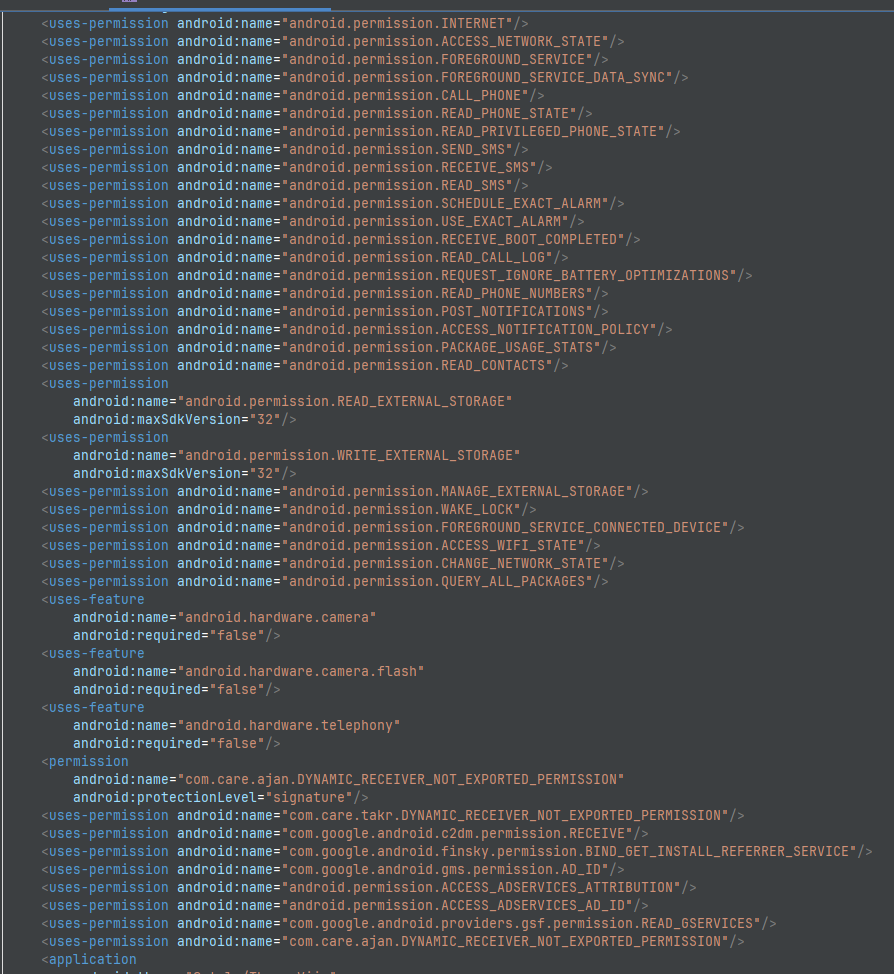
The code for the RAT was contained in com.sec.google.android.gmscore.q2b73qeu, where all of its classes lived plainly within the same package and named after their actual functionality, rather than being misleading or garbage classnames.
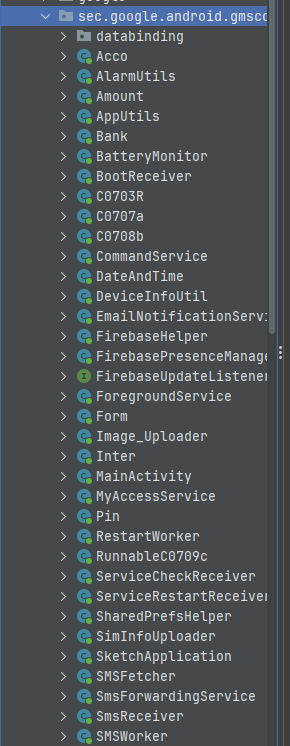
Reverse engineering the logic was quite straightforward, as there was no obfuscation or encryption present beyond the before-mentioned measures, which have been solved now.
While JADX struggled when decompiling to Java in some methods, it did not stop me from seeing what the underlying code was doing, as the lower-level instructions were sufficient.
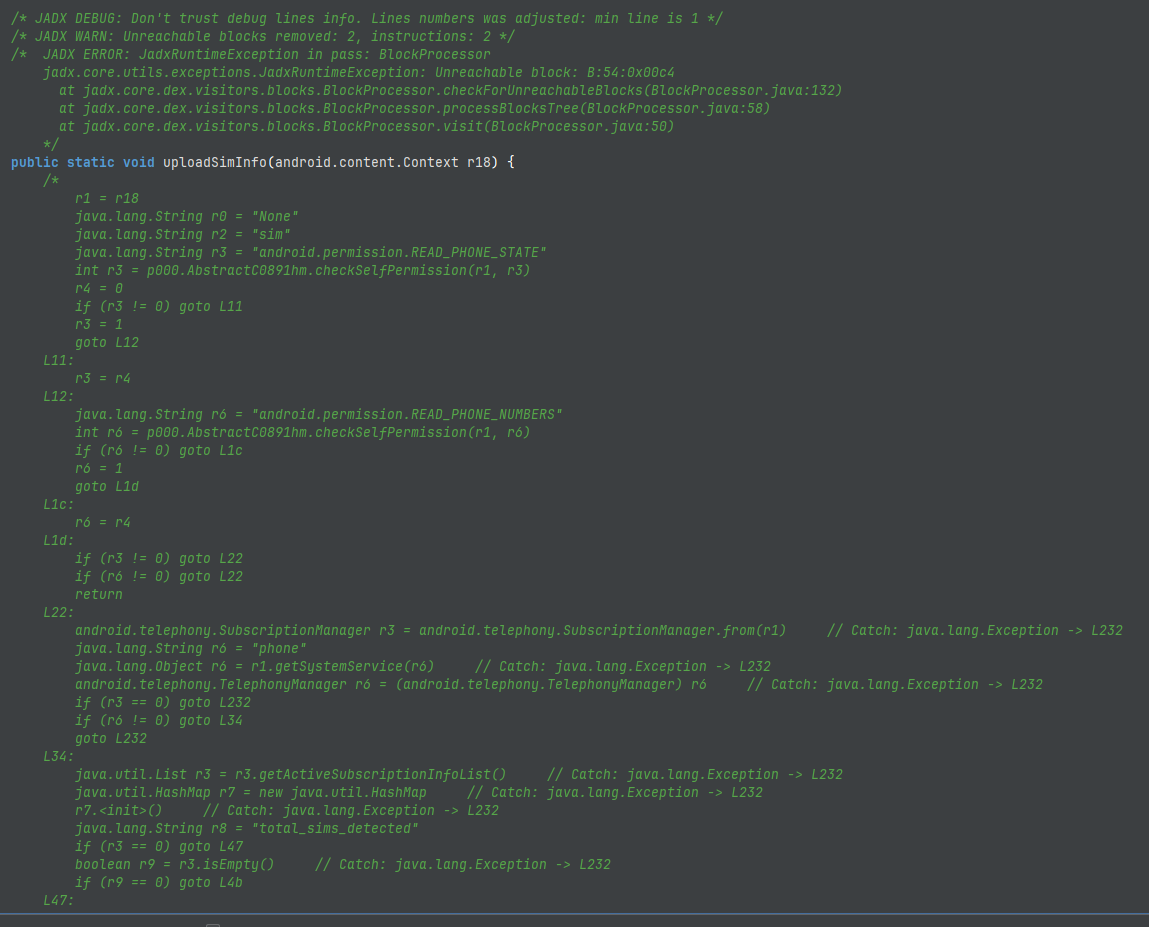
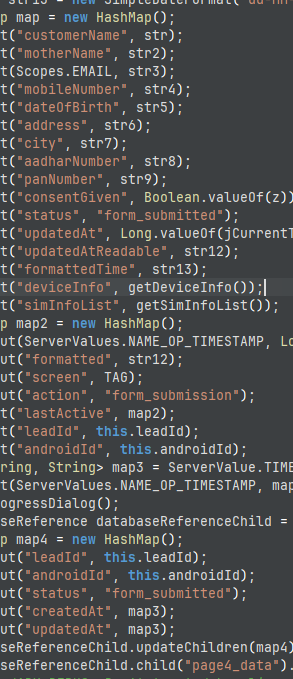
The RAT impersonates a Banking app to trick the victim into entering sensitive information to access their account details, all of which are logged to the C2 immediately upon submission.
Additionally it allowed the attacker to remotely send commands to obtain information from the victim device. All of which are listed below in a table.
| Command | Behavior |
|---|---|
call forward | Activate carrier call forwarding to a supplied number. |
forward off | Request cancellation of forwarding. |
forward status | Query forwarding status through USSD. |
send message | Send supplied SMS text using a selected active subscription. |
scan_contacts | Upload contact names and telephone numbers. |
Start_image | Start a gallery scan/upload. |
Stop_image | Signal the upload loop to stop. |
reset_gallery_cache | Clear uploaded-image fingerprints, allowing later re-upload. |
start_logs | Enable foreground-app usage and app installation/removal logging. |
stop_logs | Disable those optional logs. |
get_logs | Write an acknowledgment that logs already reside in Firebase. |
delete_logs | Delete logs and system_logs; leave activity_logs and collected data. |
reset | Refresh SIM/device information |
connect | Request Firebase online state and restart presence reporting. |
It also sends out data automatically, consisting of:
- Device/SIM/status/battery: repeated updates
- Installed apps: labels of non-system apps ->
installed_apps/<ID> - SMS history: latest five inbox messages ->
user_sms/<ID>/<sender_timestamp> - Gallery: auto-scan after ~5 sec, waits/retries every ~30 sec for storage access.
- Reads WhatsApp Images, DCIM/Camera and Screenshots folders first; queries all images only if those combined results are empty.
- Already-uploaded fingerprints are skipped. Images are converted to JPEG, maximum dimension 1024, quality 75, and sent to configured Cloudinary.
- Incoming SMS: three receiver paths can run for the same message:
- Firebase SMS record, Telegram message, and carrier-SMS forwarding if configured.
- Notifications: after notification access is enabled, non-system/non-self notification title/text/subText/bigText ->
Telegram. Selected email-package notifications additionally ->user_emails/<ID>, including extracted email/OTP. - System logs: lifecycle, command receipt/results and collection-operation events.
I wont go in-depth over what the malware is actually doing as an info-stealer as the initial focus was on the obfuscation techniques, however the code is very easy to read and go through, therefore finding out the capabilities of it is quite a simple task.
Practical implications for running it
- The Firebase command stream is a direct TLS socket (
wss://host/.ws?ns=...&v=5) and ignores Android’s HTTP/Wi-Fi proxy setting. A plain HTTP proxy will not capture that connection. Use gateway capture or a suitably configured transparent/invisible listener, and inspect the WebSocket history as well as HTTP traffic. - No app-level pinning or custom trust configuration exists, and with targetSdk 34 a user-installed Burp CA isn’t trusted by default. Trust it at system level in a disposable rooted VM.
- Analyze the decrypted payload on a clean snapshot, and study the wrapper separately. The wrapper’s VPN can interfere with observations of payload networking.
- Missing SIM subscriptions, absent notification listeners, or stale state flags can silently suppress features; use a clean snapshot and synthetic content when comparing runs.
Conclusions
The most interesting part of this sample was the gap between what Android accepted and what JADX could decode. An unexpected binary XML chunk caused JADX to return before reaching the manifest’s root element. Malformed, unreachable array-data payloads then caused decompilation to fail across all 1,945 code-bearing methods in the outer DEX. Normalizing the manifest and replacing those tails made the wrapper readable.
The bytecode technique resembles the “Hiding bytecode” example on page 5 of Obfuscation in Android malware, and how to fight back. That example uses a goto followed by fill-array-data to make a linear disassembler treat subsequent instructions as array data. Here, malformed payload widths cause JADX’s decoder to fail outright.
The consistency of the manifest irregularities and method tails suggests an automated post-processing step applied after the APK was built, although I have not established which tool produced them. Reconstructing that process, and building a detector and repair tool for APKs with the same symptoms, would make a useful follow-up.
Source references
- JADX XML parser: https://github.com/skylot/jadx/blob/master/jadx-core/src/main/java/jadx/core/xmlgen/BinaryXMLParser.java
- JADX 1.5.5 DEX payload decoder: https://raw.githubusercontent.com/skylot/jadx/v1.5.5/jadx-plugins/jadx-dex-input/src/main/java/jadx/plugins/input/dex/insns/DexInsnFormat.java
- Android resource parser: https://android.googlesource.com/platform/frameworks/base/+/refs/heads/main/libs/androidfw/ResourceTypes.cpp
- ART verifier (widths, code-flow): https://android.googlesource.com/platform/art/+/master/runtime/verifier/method_verifier.cc
- Dalvik bytecode spec (payloads as data): https://source.android.com/docs/core/runtime/dalvik-bytecode
- analogous JADX packer issue: https://github.com/skylot/jadx/issues/1926
- Obfuscation in Android malware, and how to fight back: https://www.virusbulletin.com/uploads/pdf/magazine/2014/vb201407-Android-obfuscation.pdf
- Firebase init provider: https://raw.githubusercontent.com/firebase/firebase-android-sdk/master/firebase-common/src/main/java/com/google/firebase/provider/FirebaseInitProvider.java
- VPN allowlist semantics: https://developer.android.com/reference/android/net/VpnService.Builder#addAllowedApplication(java.lang.String)
- Burp invisible proxying: https://portswigger.net/burp/documentation/desktop/tools/proxy/invisible
Thanks for reading.
Back to all posts